

Buffer vs DumbSMM (2026): A Buffer Review From a Competitor
Buffer review 2026: Free for 3 channels, then $6 per channel a month. Where Buffer beats DumbSMM, and when a free short-video tool fits better.
 DumbSMM Team
On this page 8 sections
- What is Buffer?
- What Buffer reviews say
- Buffer pricing in 2026
- Buffer vs DumbSMM at a glance
- What Buffer costs one person posting short video
- Where Buffer wins
- Where DumbSMM wins (full disclosure: we make it)
- Which should you pick?
- Other social media schedulers to consider
- Buffer vs DumbSMM FAQ
- Is Buffer free?
- Is Buffer worth it?
- Does Buffer post for you?
- Can Buffer post to TikTok automatically?
- Does Buffer have analytics?
- Does Buffer have an API?
- What is a free Buffer alternative for short video?
That's our Buffer review in four sentences. A competitor wrote it, so we'll be specific about where Buffer is better, and there's a lot of it. Everything below comes from Buffer's own website, help center and terms, plus three review sites.
Prices checked on October 12, 2026, in USD, before tax. Buffer changes its plans from time to time, so check buffer.com/pricing before you pay.
What is Buffer?#
Buffer is a social media scheduler that publishes to 12 networks, with a content calendar, an AI writing assistant, a comment inbox called Community and lightweight analytics called Insights. The networks are Instagram, Facebook, TikTok, LinkedIn, X (Twitter), YouTube (Shorts only), Threads, Pinterest, Google Business Profile, Bluesky, Mastodon and Substack. Start Page, Buffer's link-in-bio page, comes with it.
It's made for creators, small businesses and agencies, and it charges per connected channel. The Free plan needs no card.
Buffer is a scheduler first. Its AI Assistant writes captions using OpenAI models, but Buffer says its posting, scheduling and planning features "aren't AI-powered." It doesn't make videos either. Video work inside Buffer stops at picking a thumbnail frame and writing a title.
It's big, too. Buffer's open dashboard showed 83,118 customers and $27.1M in annual recurring revenue when we looked on October 12, 2026. One recent change: Buffer retired Buffer Analyze on October 7, 2026, and analytics now live in Insights.
What Buffer reviews say#
Review sites mostly like Buffer. Here's what we saw on October 12, 2026:
- Capterra: 4.5 out of 5 from 1,492 reviews.
- GetApp: 4.5 out of 5 on the same reviews, with 4.6 for ease of use and 4.4 for value for money.
- Trustpilot: a TrustScore of 3.8 from 129 reviews, split between 34% 5-star and 40% 1-star.
The Trustpilot complaints rhyme. One reviewer says the analytics don't offer many options. Another quit because posts landed on his phone as reminders instead of publishing, which is what happens without an Instagram creator or business account. A third, running a daily schedule, called posting "unstable and unreliable" (July 2, 2026).
Buffer pricing in 2026#
Buffer has three plans in 2026: Free at $0, Essentials at $6 per channel a month and Team at $12 per channel a month, with two months off if you pay yearly.
| Free | Essentials | Team | |
|---|---|---|---|
| Price | $0, up to 3 channels | $6/channel/month, or $5 billed yearly ($60/channel/year) | $12/channel/month, or $10 billed yearly ($120/channel/year) |
| Scheduled posts | 10 per channel at a time | Unlimited (fair use: 5,000 per channel) | Unlimited (same cap) |
| Users | 1 | 1 | Unlimited, with approvals |
| Analytics | 30 days of history | Unlimited history, reports | Adds branded reports |
| Comment inbox | Yes, 5 AI reply suggestions a week | Yes, unlimited AI replies | Yes, unlimited AI replies |
| API | 1 key, 3,000 requests/month | 3 keys, 7,500/month | 5 keys, 15,000/month |
A channel is one connected account, like one Instagram profile or one TikTok. Past 10 channels, both paid plans charge $4 for each extra channel, then $3 for channels 26 to 50, and they bill every channel, including the 3 you had on Free. The full per-channel math, agency setups included, is in our Buffer pricing breakdown.
Buffer vs DumbSMM at a glance#
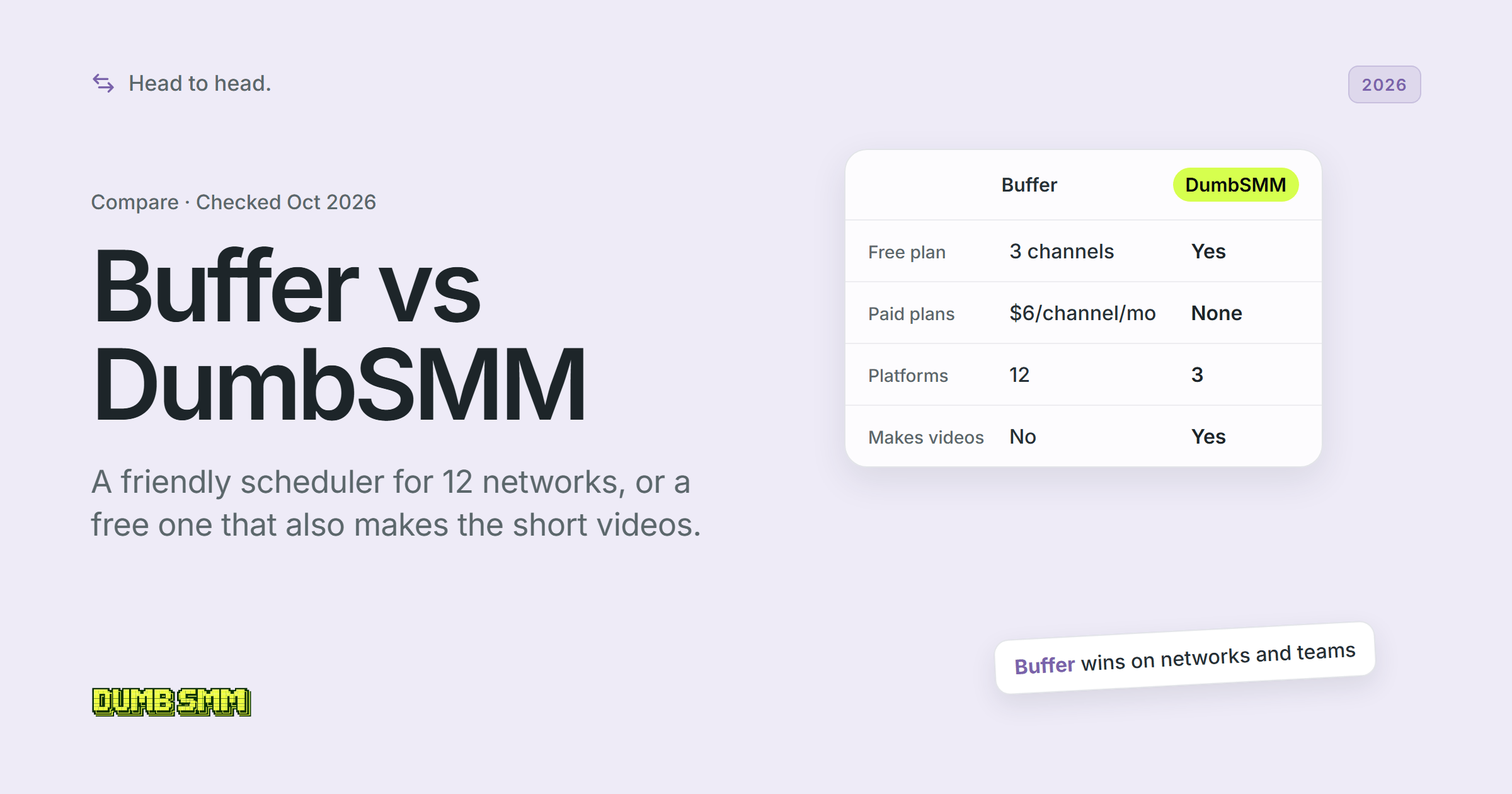
Buffer covers far more of social media, while DumbSMM covers three short-video platforms and also makes the videos. Full disclosure: we make DumbSMM.
| Buffer | DumbSMM | |
|---|---|---|
| Starting price | $0 Free; paid from $6/channel/month ($5 billed yearly) | Free ($0); no paid plans offered today |
| Free plan | Yes: 3 channels, 10 queued posts per channel, 1 user, no card | Yes: tools need no account; scheduling and auto-posting free |
| Platforms | 12: Instagram, Facebook, TikTok, LinkedIn, X, YouTube Shorts, Threads, Pinterest, Google Business Profile, Bluesky, Mastodon, Substack | 3: TikTok, Instagram Reels, YouTube Shorts |
| TikTok direct publish | Yes; music, polls and videos over 10 minutes need a phone notification | Yes (auto-posting) |
| Reels / Shorts | Yes: Reels for Professional Instagram accounts; Shorts up to 3 minutes; no long-form YouTube | Yes: auto-posting to Reels and Shorts |
| Creates video | No video creation tool listed | Yes: UGC-style videos, product demos and memes (short video maker) |
| Clipping long videos | Not offered | Yes: captioned vertical clips, no watermark (AI clip maker) |
| AI writing | Yes: AI Assistant for captions and ideas, all plans | Not stated (hook text is added to generated videos) |
| Best-time scheduling | Recommended slots from general platform data, not your audience | Yes: adapts to each account's best weekday and time |
| Account health / shadowban monitoring | Not stated | Yes: watches each account's views, slows posting when they drop |
| Analytics | Insights on all plans, 10 networks; basic for TikTok and YouTube | No full analytics dashboards |
| Engagement inbox | Yes: Community, all plans, 10 networks | No |
| Team seats / approvals | Team plan: unlimited users, approvals, access levels | No |
| API | Yes, all plans: GraphQL API, MCP server, CLI | No public API |
What Buffer costs one person posting short video#
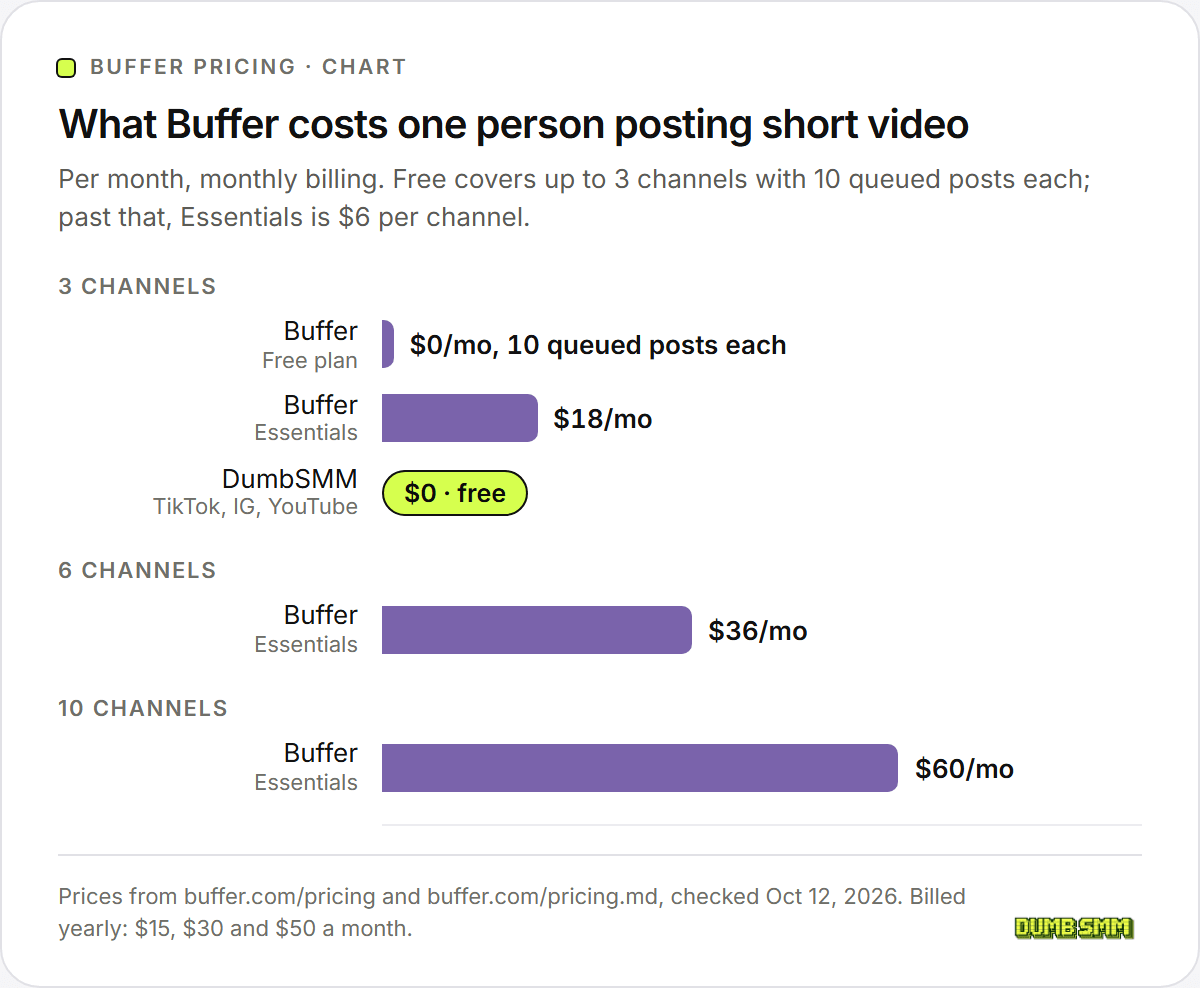
Working solo, you never need Team. At 3 channels (TikTok, Instagram, YouTube), Buffer Free costs nothing if 10 queued posts per channel is enough: at one video a day, that's about 10 days of lead time, and a slot opens each time a post goes out. Past 3 channels you need Essentials, which bills $6 a month for every account, the first 3 included.
| Channels | Buffer plan you need | Monthly billing | Yearly billing |
|---|---|---|---|
| 3 | Free (10 queued posts per channel), else Essentials | $0, or $18/month | $0, or $15/month ($180/year) |
| 6 | Essentials (Free stops at 3) | $36/month | $30/month ($360/year) |
| 10 | Essentials | $60/month | $50/month ($600/year) |
DumbSMM is $0 for TikTok, Instagram Reels and YouTube Shorts.
Where Buffer wins#
Buffer wins on breadth, teams, analytics and maturity, and not by a little.
- It reaches 12 networks to our 3, including LinkedIn, X, Facebook, Threads, Pinterest, Bluesky, Mastodon, Google Business Profile and Substack.
- It posts everything: text, images, carousels, Stories, threads, LinkedIn PDF documents, Substack Notes, Facebook Reels, Instagram trial reels and collaborator posts. We post short video only.
- Every plan, Free included, gets Community, a comment inbox for 10 networks (TikTok and YouTube among them) with AI reply suggestions and saved replies.
- Insights covers 10 networks, with CSV, Markdown and PDF exports on paid plans. One reviewer found it thin for client work. We don't have full analytics dashboards at all.
- The Team plan gives you unlimited users, approval workflows and per-channel access levels.
- There's an API on every plan, plus an MCP server, a CLI, Zapier, Make, n8n and IFTTT. Add iOS and Android apps, a browser extension, and Canva, Dropbox and Google Drive integrations.
- Reels can carry music and still auto-publish if the Instagram account is connected through Facebook. One line in Buffer's Instagram help article says otherwise, so test it first.
- The Free plan is generous: 3 channels, AI writing, the inbox and 30 days of analytics, with no card. Nonprofits get 50% off paid plans.
Where DumbSMM wins (full disclosure: we make it)#
DumbSMM wins when your whole social plan is short video on TikTok, Instagram and YouTube.
- The bill doesn't grow per account. Scheduling and auto-posting are free with an account, and there are no paid plans on offer today. Buffer charges $6 per channel a month once you pass Free's 3 channels or 10 queued posts per channel.
- It makes the videos. The AI clip maker turns a long video or a YouTube link into captioned vertical clips with no watermark. The short video maker turns your website into UGC-style videos (a stock reaction clip, hook text and your product demo), product demos and memes. Buffer lists no video creation or clipping tool.
- Posting times come from your own views. Once your posts have history, DumbSMM favours the hours and weekdays that got each account the most views. Buffer's help center says its recommended times come from general platform data, "not on your own audience's activity." Its TikTok page promises posting "at the time your audience is most active," so Buffer's own pages don't quite agree. Generic charts, ours for Instagram included, are only a starting point.
- It notices when views crash. Once a day, DumbSMM compares each account's recent views with its usual numbers. If one platform drops to near zero, it slows posting there only, emails you a recovery checklist, and speeds back up as views recover. Our own page admits it "can't read TikTok's mind," but a cliff in your views is hard to miss. Buffer lists nothing like it.
- Natural timing. Posts on one account go out hours apart, a few minutes off the hour, in the time zone you pick.
- You can try it without signing up. The public tools work before you make an account.
DumbSMM doesn't do other networks, text or image or carousel posts, a comment inbox, team seats, approvals, a public API, link in bio or deep analytics. It's also young, with no Capterra or Trustpilot reviews to point to. If you need any of that, Buffer is the better tool.
Which should you pick?#
Pick Buffer for breadth and teams, and DumbSMM if you post short video and need it made for free.
Pick Buffer if:
- You post anywhere besides TikTok, Instagram and YouTube, or you post text, images and threads.
- Someone else needs a login, or clients approve posts before they go out.
- You want one inbox for comments across your networks.
- You need analytics exports, an API or Zapier.
- You already have your videos and 3 channels with 10 queued posts each is enough. Then Buffer Free is $0 too.
Pick DumbSMM if:
- You only post short video to TikTok, Instagram Reels and YouTube Shorts.
- You need the videos made, from long videos or from your website.
- You don't want a bill that grows with every account you connect.
- You want posting times learned from your own views, and a check that eases off when they crash.
Start with the short video maker (no account needed), then connect your accounts in Schedule.
Other social media schedulers to consider#
Hootsuite, Later and Postiz are the other schedulers people weigh against Buffer. We line them all up with DumbSMM, free options included, in Hootsuite alternatives.
If Hootsuite is on your list, read Hootsuite vs DumbSMM. Whichever you shortlist, price your real setup on each one: channels, people, monthly or yearly. Tools bill in different units, so the cheapest at 3 channels isn't always the cheapest at 15.
If you care more about making the videos than about the calendar, read our AI TikTok automation tools roundup next.
Buffer vs DumbSMM FAQ#
Is Buffer free?#
Yes. Buffer's Free plan is $0 forever with no card, and in 2026 it covers up to 3 channels, 10 scheduled posts per channel at a time, 1 user and 30 days of analytics. The help center adds a lifetime cap of 8 unique channel connections on Free.
Is Buffer worth it?#
For posting across many networks, most reviewers think so: Capterra shows 4.5 out of 5 from 1,492 reviews, and Trustpilot shows 3.8 from 129 (both seen October 12, 2026). Paying makes sense once you need more than 3 channels, more than 10 queued posts per channel, or a team. For short video only, a free tool like DumbSMM (ours) may be enough.
Does Buffer post for you?#
Yes, on most channels. Buffer auto-publishes to Instagram professional accounts, Facebook Pages, TikTok, LinkedIn, X, YouTube Shorts and most other networks. Instagram personal profiles and Facebook groups only get a phone notification to finish the post yourself, and so do TikTok posts with music or polls.
Can Buffer post to TikTok automatically?#
Yes, for TikTok videos from 3 seconds to 10 minutes and up to 1GB, with up to 25 posts per 24 hours. Buffer can't reach TikTok's music library or polls, so a post that needs trending audio goes out as a reminder to finish in the TikTok app. TikTok's Promote feature also doesn't work on posts sent through Buffer.
Does Buffer have analytics?#
Yes. Insights is on every Buffer plan, with 30 days of history on Free and unlimited history plus CSV, Markdown and PDF exports on paid plans. It has no drag-and-drop report builder, no audience demographics yet and no best-time recommendations. Buffer Analyze was retired on October 7, 2026.
Does Buffer have an API?#
Yes, on every plan, Free included. Buffer offers a GraphQL API, an MCP server for AI assistants and a CLI, with 3,000 requests per 30 days on Free, 7,500 on Essentials and 15,000 on Team. DumbSMM has no public API.
What is a free Buffer alternative for short video?#
DumbSMM is free (we make it), including scheduling and auto-posting to TikTok, Instagram Reels and YouTube Shorts, and it makes the videos too. It doesn't do text posts, other networks, teams or a comment inbox. For a broader free scheduler, Buffer's own Free plan covers 3 channels.
Sources:
- Buffer pricing
- Buffer machine-readable pricing
- Buffer homepage
- Buffer for TikTok
- Buffer AI Assistant
- Buffer help: Pricing and features
- Buffer help: Information about free trials
- Buffer help: Refund policy
- Buffer help: Connecting your channels to Buffer
- Buffer help: Using TikTok with Buffer
- Buffer help: Using YouTube Shorts with Buffer
- Buffer help: Scheduling Instagram posts, Reels and Stories
- Buffer help: Adding music, stickers and other effects
- Buffer help: Sharing videos through Buffer
- Buffer help: Using Buffer's AI Assistant
- Buffer help: Getting started with analytics
- Buffer help: Time zones and posting schedules
- Buffer help: Using Community
- Buffer help: What is Buffer's API?
- Buffer help: Adding users and setting up permissions
- Buffer Terms of Use
- Buffer on Trustpilot
- Buffer on Capterra (UK)
- Buffer on GetApp
All checked October 12, 2026. DumbSMM is not affiliated with Buffer.