

Auto Posting Tools Compared (2026): 9 Autoposters for TikTok, Reels and Shorts
Auto posting tools for TikTok, Reels and Shorts compared: cost for 3 accounts, free plans, queues, best-time posting and which ones use official APIs.
 DumbSMM Team
On this page 16 sections
- What is auto posting?
- How do autoposters actually post? (Official APIs vs bots)
- The 9 auto posting tools at a glance
- What auto posting costs for TikTok, Reels and Shorts
- Buffer: best cheap autoposter for a few accounts
- Hootsuite: best for teams that want best-time posting
- Later: best for Instagram-first creators
- Metricool: best free plan with analytics
- Publer: best free plan for posting on a schedule
- SocialBee: best for recycling evergreen content
- Postiz: best open-source autoposter
- Blotato: best for AI agents and automations
- Free ways to auto post (no tool needed)
- DumbSMM: free autopilot that also makes the videos (full disclosure: we make it)
- Which auto posting tool should you pick?
- Auto posting FAQ
- Is auto posting allowed on TikTok and Instagram?
- Can auto posting get you shadowbanned?
- Is there a free auto posting tool?
- Can you schedule TikTok posts?
- How do I post to all social media at once?
- What is the difference between scheduling and auto posting?
- Why does my Instagram auto post send a notification instead?
"Auto posting" means three different things depending on who's selling it. To one tool it means you pick a time and it hits publish. To another it means a weekly queue that fills itself. To a third it means AI writes, renders and posts videos while you sleep.
And there's a fourth meaning you want to stay away from: a bot that logs in as you. That's the version that gets accounts locked.
So we compared nine autoposters on the thing most people actually want: short videos going out to TikTok, Instagram Reels and YouTube Shorts on a schedule, without a phone reminder at 8 PM. We checked prices, free plans and posting features on each company's own pricing page or help center, and we read the platforms' developer docs to explain what's happening under the hood.
Prices checked on October 29, 2026, in USD, before tax. Prices change often, so check the linked pricing pages before you buy.
What is auto posting?#
Auto posting is when a tool publishes a post to your social account at a scheduled time, without you tapping publish. You connect your accounts once, upload the post, and the tool sends it through the platform's API when the time comes.
Most tools now go further than "post at 5 PM." Here's the ladder, from least to most automatic:
| Level | You do | The tool does | Examples |
|---|---|---|---|
| 1. Scheduled posting | Pick the exact time for every post | Publishes at that time | TikTok, Instagram and YouTube's own schedulers |
| 2. Queue slots | Set weekly time slots once | Drops each new post into the next open slot | Buffer, Metricool Autolists, Publer, SocialBee, Postiz, Blotato |
| 3. Best-time scheduling | Approve posts | Picks times from your own account's data | Hootsuite, Later, Publer (Business plan) |
| 4. Recycling | Fill a library once | Re-posts evergreen content on a loop | SocialBee, Metricool, Publer (not TikTok or YouTube) |
| 5. Autopilot | Approve videos | Makes the videos and keeps the calendar full | DumbSMM, Blotato (AI video credits) |
Level 1 is free everywhere. Levels 2 to 5 are what you pay for.
How do autoposters actually post? (Official APIs vs bots)#
A safe autoposter publishes through each platform's official API, after you log in on the platform's own permission screen. It never asks for your password. A bot does the opposite: it logs in as you, or drives a browser or phone to tap the buttons, and all three platforms' terms ban that.
Here's what the official route looks like on each platform, from their developer docs:
| TikTok | YouTube | ||
|---|---|---|---|
| Official API | Content Posting API | Instagram Platform content publishing | YouTube Data API (videos.insert) |
| Account needed | Personal or business | Professional (Business or Creator) | Any YouTube channel |
| Daily cap | "Typically around 15 posts per day" per creator account, shared across all apps | 100 API-published posts per 24 hours (one section of Meta's docs says 50) | Apps get 100 uploads a day by default, shared by all their users |
| The catch | Apps TikTok hasn't audited can only post privately | Personal accounts can't auto-publish | Some uploads default to private based on your channel settings |
Two things in that table explain most "why didn't my post go out?" complaints:
- TikTok's audit. TikTok says all content posted by unaudited apps is "restricted to private viewing mode." TikTok also requires apps to let you pick the privacy setting yourself, with no default value. That's why a good TikTok autoposter asks you who can see each post.
- Instagram's account type. Instagram only lets professional accounts publish through the API. On a personal account, most tools fall back to a phone notification and you finish the post yourself.
And the bot route? TikTok's terms bar extracting data with "any automated system or software, including automated 'bots'" without written approval. Instagram's terms ban "creating accounts or accessing or collecting information in an automated way without our express permission." YouTube's terms ban accessing the service with "any automated means (such as robots, botnets or scrapers)" outside narrow exceptions.
Red flags in an autoposter:
- It asks for your TikTok or Instagram password instead of sending you to the platform's own login screen.
- It's a browser extension or phone app that "taps for you."
- It promises unlimited posts, when the platforms themselves cap API posting.
Every tool in this comparison connects through the platforms' permission screens. Blotato says it outright: "Publishing runs on each platform's official API, not browser automation." Hootsuite and Later are named as TikTok Content Marketing Partners on TikTok's own blog (March 2025).
The 9 auto posting tools at a glance#
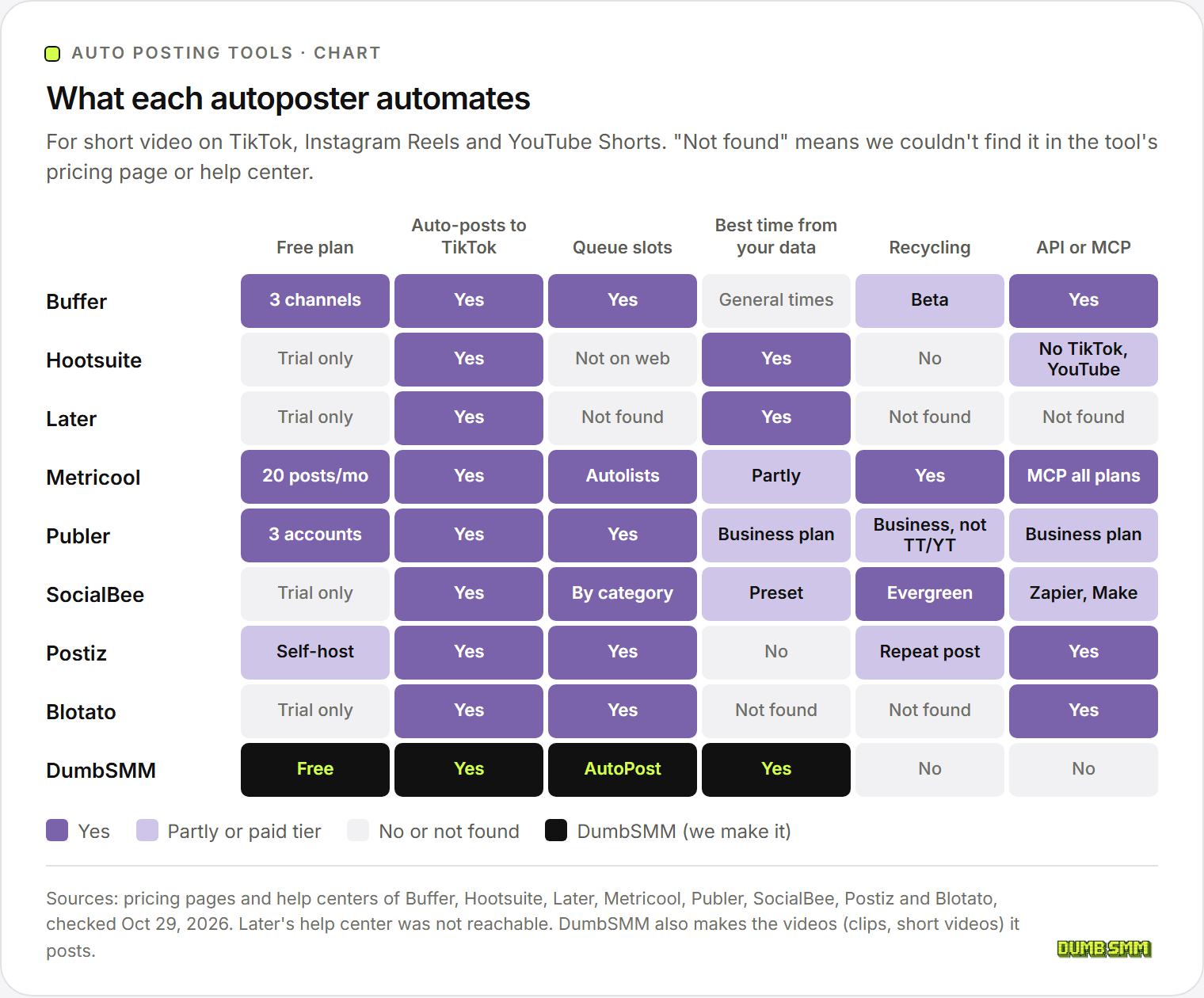
| Tool | 3 accounts (TT + IG + YT), billed monthly | Billed yearly | Free plan | Auto-publishes to TikTok | Queue slots | Best time from your data | Recycling |
|---|---|---|---|---|---|---|---|
| Buffer | $18/mo (Essentials, $6 per channel) | $15/mo | Yes: 3 channels, 10 queued posts each | Yes | Yes | No (general times) | Beta |
| Hootsuite | $149/mo (Standard, 10 accounts) | $99/mo | No (14-day trial) | Yes | Not on web | Yes | No |
| Later | $25/mo (Starter, 30 posts per profile) | $18.75/mo | No (14-day trial) | Yes | Not found | Yes | Not found |
| Metricool | $25/mo (Starter, 5 brands) | $20/mo | Yes: 1 brand, 20 posts a month | Yes | Yes (Autolists) | Partly | Yes |
| Publer | From $5/mo per account (Professional) | 20% off | Yes: 3 accounts, 10 queued posts each | Yes | Yes | Business plan | Business plan, not TikTok or YouTube |
| SocialBee | $29/mo (Bootstrap, 5 profiles) | $24.20/mo | No (14-day trial) | Yes, or reminders | Yes (by category) | Preset times | Yes (evergreen) |
| Postiz | $29/mo (Standard, 5 channels) | $23/mo | Self-host free (open source) | Yes (cloud) | Yes | No | Repeat posts |
| Blotato | $29/mo (Starter, 20 accounts) | ~17% off | No (7-day trial) | Yes | Yes | Not found | Not found |
| DumbSMM | No paid plans | No paid plans | Free | Yes | Yes (AutoPost) | Yes | No |
"Not found" means we couldn't find the feature in that tool's pricing page or help center on October 29, 2026, not that it definitely doesn't exist. Later's monthly price is worked out from the 25% yearly discount on its pricing page, and Publer's plans page didn't load, so its price comes from Publer's help center.
What auto posting costs for TikTok, Reels and Shorts#
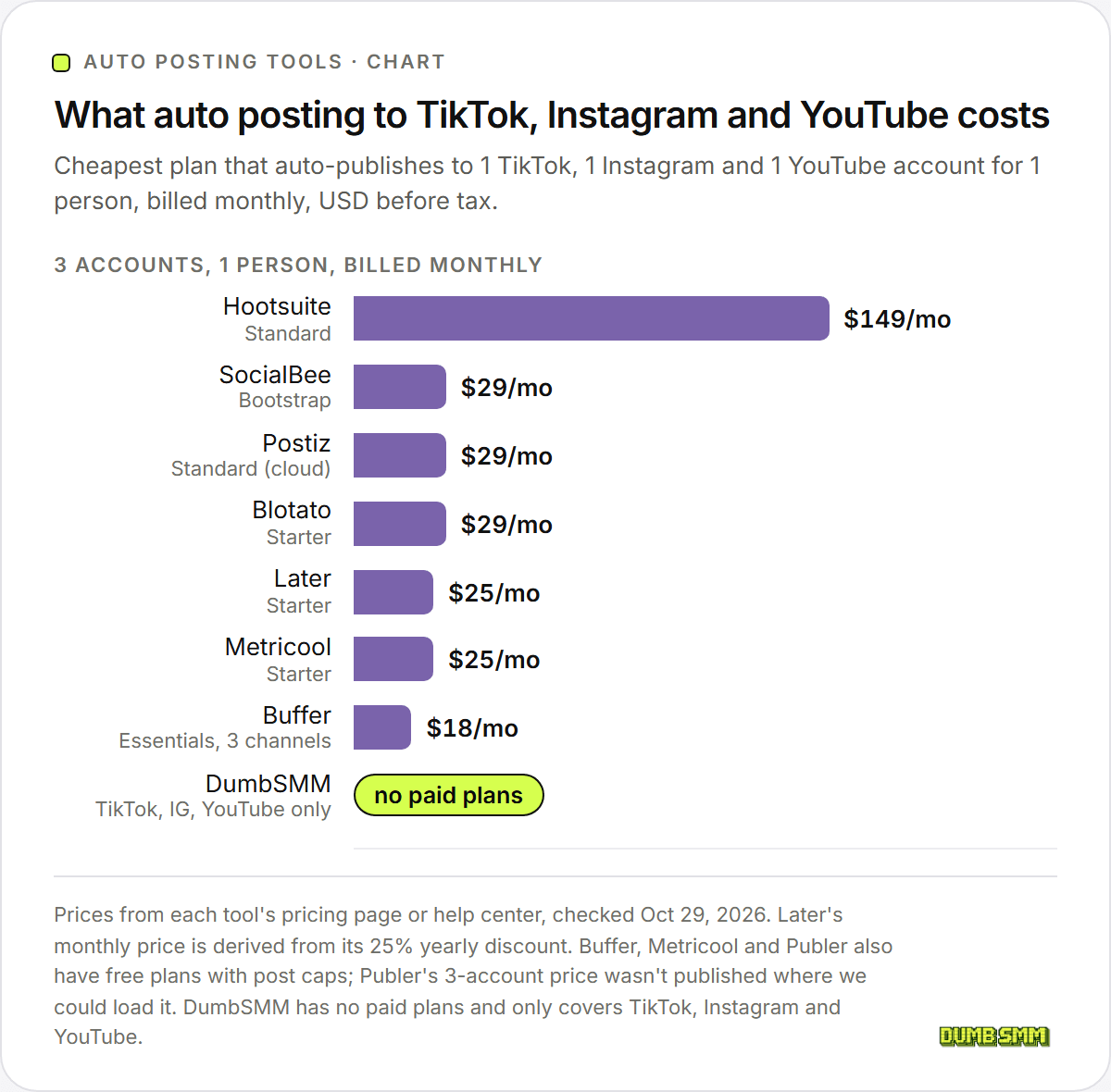
For one person posting to one TikTok, one Instagram and one YouTube account, billed monthly: Hootsuite costs $149, the $29 group (SocialBee, Postiz, Blotato) sits in the middle, Later and Metricool cost $25, and Buffer costs $18. Billed yearly, every paid tool drops by roughly 17% to 34%.
The cheap end has a catch worth knowing about. Buffer's free plan holds 10 queued posts per channel, Publer's holds 10 per account, and Metricool's free plan stops at 20 posts a month in total. That's fine for a few posts a week. Post daily to three platforms and Metricool's 20 posts run out in about a week, while Buffer and Publer only let you queue about 10 days ahead.
The expensive end is buying something else. Hootsuite's $149 Standard plan covers 10 accounts, best-time recommendations from your own data, and the analytics and team tools a social media manager needs. You don't need that to post three videos a day.
Buffer: best cheap autoposter for a few accounts#
Buffer is a per-channel scheduler: $6 per channel a month, so three channels cost $18/mo, or $15/mo billed yearly. Its free plan covers 3 channels with 10 scheduled posts each, which makes it the easiest free starting point here.
Buffer's auto posting is a weekly queue. You set time slots, hit "Add to Queue," and each post takes the next open slot. Per Buffer's help center, TikTok videos publish automatically, but videos with TikTok music or polls go out as a phone notification instead. Instagram Reels auto-publish only for professional accounts. Buffer's YouTube support is Shorts only.
Where it falls short: Buffer's recommended times are general, not based on your own followers, and video posts can't be bulk uploaded. Buffer has an API on every plan, plus Zapier, Make and n8n. More in our Buffer pricing breakdown.
Hootsuite: best for teams that want best-time posting#
Hootsuite costs $149 per user a month on the Standard plan ($99 billed yearly) and has no free plan, just a 14-day trial. For that you get 10 accounts and recommended posting times based on your own last 30 days of data, TikTok included.
Hootsuite publishes directly to TikTok, Instagram and YouTube. Instagram direct publishing needs a Business profile: Hootsuite's help center says Instagram requires the notification method for Creator profiles. Hootsuite's AutoSchedule, which picks times for you, is only in its Amplify product and mobile app, not the web composer. Its public API doesn't support TikTok or YouTube.
Hootsuite is the most complete tool here and by far the most expensive. See our Hootsuite pricing guide and Hootsuite alternatives.
Later: best for Instagram-first creators#
Later bills per "social set" (one profile per network): Starter is $18.75/mo billed yearly, or $25/mo billed monthly, for 30 posts per profile a month. There's no free plan on the pricing page, only a 14-day trial.
Later auto-publishes to TikTok, Instagram Reels and YouTube Shorts (for Shorts, "no notifications required," in its own words), and its Best Time to Post feature turns on by itself once your profile is eligible. Later is named as a TikTok Content Marketing Partner. We couldn't find queue slots, recycling or a public API in Later's docs, and its help center blocked us, so its personal-account TikTok rules are unverified.
The 30-posts-per-profile cap on Starter is the thing to watch: daily posters need Growth ($37.50/mo billed yearly, 180 posts).
Metricool: best free plan with analytics#
Metricool's free plan covers one "brand" (one profile per network) with 20 posts a month, and its Starter plan is $25/mo ($20 billed yearly) for 5 brands. It's the only free plan here that comes with real analytics.
Metricool's auto posting tool is called Autolists: weekly time slots that fill from a list, with an option to repeat the list on a loop (so it doubles as recycling). It auto-publishes to TikTok "for personal and business accounts" when Auto Publish is on, to Reels for business or creator profiles, and to YouTube Shorts under 3 minutes. Best-time suggestions use your own data for TikTok Business and Instagram, and general studies for YouTube. There's an MCP server on every plan, Free included, and an API on Advanced.
Publer: best free plan for posting on a schedule#
Publer's free plan covers 3 accounts with up to 10 scheduled posts per account, and AutoSchedule into your own posting schedule is included for free. Paid plans start at $5/mo for one account on Professional and $10/mo on Business, with 20% off yearly.
On TikTok you choose "Post Automatically" or a reminder, and Publer posts to one TikTok account per post. Reels auto-publish for Creator and Business accounts, and Shorts post directly. The smart features sit on the Business plan: best times from your analytics, automatic recycling (not for TikTok or YouTube), recurring posts, the API and MCP. Publer's plans page didn't load for us, so check the exact 3-account price there.
SocialBee: best for recycling evergreen content#
SocialBee's Bootstrap plan is $29/mo ($24.20 billed yearly) for 5 profiles, with a 14-day trial and no free plan. Its whole design is content categories: each category gets its own weekly slots, and an Evergreen category keeps re-posting on a loop.
SocialBee posts directly to TikTok or sends a reminder, chosen per profile, and says some TikTok posts can't be published directly because of TikTok's API limits. Reels publish directly only on Business profiles. Creator and personal profiles get reminders. YouTube Shorts post directly. Its "best practices" schedule is a preset, not your own data. There's Zapier and Make, but no public API yet.
Postiz: best open-source autoposter#
Postiz Cloud starts at $29/mo ($23 billed yearly) for 5 channels, and the self-hosted version is free under the AGPL-3.0 open-source license. It's the only tool here you can run on your own server.
Postiz has manual time slots, a "Repeat Post Every" option, an API, MCP server and CLI on every plan, and n8n, Make and Zapier. On TikTok you choose Direct Post or Upload (a draft you finish in the app within 24 hours). The self-hosting catch is the TikTok audit from earlier: Postiz's docs say a self-hosted install posts privately until your own TikTok developer app passes TikTok's review. There's no best-time feature, and the cloud trial needs a card.
Blotato: best for AI agents and automations#
Blotato's Starter plan is $29/mo for 20 accounts, with a 7-day trial (card required) and no free plan. It's built to be driven by an API, MCP server, n8n or Make, and its credits pay for AI images and AI video.
Blotato publishes directly to TikTok, Reels (Business or Creator accounts) and Shorts, with weekly slots and a "next free slot" option. Starter allows posts to 3 different TikTok accounts per rolling 24 hours, and 25 posts per TikTok account per day. We didn't find best-time scheduling or recycling in its docs. Compared with the other tools here, it's the most hands-off if you already build automations.
Free ways to auto post (no tool needed)#
TikTok, Instagram and YouTube each let you schedule posts for free in their own apps. The catch is that you schedule each platform separately, and you still pick every time by hand.
- Instagram: schedule up to 25 posts a day, up to 30 days ahead, on a public account, per Instagram's help center.
- YouTube: upload in YouTube Studio, open the Schedule card and pick a date, time and time zone (YouTube Help).
- TikTok: TikTok's web and desktop scheduler lets you set a time before posting. TikTok's own pages disagree on how far ahead you can go, so check the limit on your screen.
If you post to one platform a few times a week, that's all you need.
DumbSMM: free autopilot that also makes the videos (full disclosure: we make it)#
We built DumbSMM, so weigh this section with that in mind.
DumbSMM's scheduler has an autopilot called AutoPost. You pick how many posts a day you want and your time zone, switch it on, and every 10 minutes it puts approved videos into the next free slots. Once your posts have some history, it favors the hours and weekdays that got your account the most views. Posts on one account are spaced hours apart and shifted a few minutes off the hour, and new accounts start slow.
Two things the others above don't do:
- It makes the videos. The free clip maker turns a YouTube link or upload into captioned vertical clips, and the short video maker builds short videos from your website. They land in your library, ready for AutoPost.
- It watches your views. Once a day it compares each account's recent views with its usual numbers. If one platform dips to near zero, it slows only that platform and emails you a checklist, then speeds back up as views recover.
It posts through the official TikTok Content Posting API, Instagram's publishing API and the YouTube Data API, after you connect each account on the platform's own permission screen. There are no paid plans.
Where the others win: DumbSMM only posts short videos to TikTok, Instagram Reels and YouTube Shorts. No X, LinkedIn, Facebook pages, images or carousels. It has no recycling, no team seats, no public API and no deep analytics. If you need those, Buffer, Hootsuite, Metricool or Postiz are better fits. Compare it head to head in Buffer vs DumbSMM and Hootsuite vs DumbSMM.
Which auto posting tool should you pick?#
- Posting a few times a week to one platform: the platform's own scheduler. Free.
- Posting to 3 platforms on a budget: Buffer's free plan, then Essentials at $18/mo.
- Want analytics with a free plan: Metricool.
- Recycling evergreen posts: SocialBee.
- A team with clients and approvals: Hootsuite.
- You build automations or AI agents: Blotato, or Postiz if you want open source.
- You need the videos too, not just the posting: DumbSMM, free.
Once your tool is set, the next question is when it should post. Our merged studies cover the best time to post on TikTok and on Instagram.
Auto posting FAQ#
Is auto posting allowed on TikTok and Instagram?#
Yes, through their official APIs. TikTok's Content Posting API and Instagram's content publishing API exist so approved apps can post for you. What the platforms' terms ban is automated access without permission, like bots that log in as you or scrape data.
Can auto posting get you shadowbanned?#
Using an official-API scheduler isn't against the rules, and we found nothing in TikTok's, Instagram's or YouTube's docs saying posts published through their APIs rank lower. Bots and posting far past the platforms' caps are the real risk. TikTok's own guidance puts the typical limit at around 15 posts per day per account.
Is there a free auto posting tool?#
Yes. Buffer (3 channels, 10 queued posts each), Publer (3 accounts, 10 queued posts each) and Metricool (20 posts a month) have free plans that auto-post to TikTok, Instagram and YouTube. Postiz is free if you host it yourself. DumbSMM has no paid plans.
Can you schedule TikTok posts?#
Yes. TikTok's own web and desktop scheduler lets you pick a time, and tools like Buffer, Hootsuite, Later, Metricool, Publer, SocialBee, Postiz, Blotato and DumbSMM auto-publish to TikTok through its Content Posting API. Several tools can't add TikTok's licensed music, so those videos go out as a reminder you finish in the app.
How do I post to all social media at once?#
Use an autoposter that publishes to several networks from one post, like Buffer, Hootsuite, Metricool, Publer, Postiz or Blotato. Connect each account once, write the post, tick the platforms and schedule it. DumbSMM does this for short video on TikTok, Instagram and YouTube.
What is the difference between scheduling and auto posting?#
Scheduling means you pick the exact time for each post. Auto posting usually means the tool picks or fills the time for you, from a queue of weekly slots, your best-performing hours or a recycled library. Most tools in this list do both.
Why does my Instagram auto post send a notification instead?#
Instagram only lets professional (Business or Creator) accounts publish through its API. On a personal account, autoposters send you a phone notification to finish the post. Some tools also need a Business profile, not Creator, for direct Reels publishing.
Sources:
- Buffer: Pricing
- Hootsuite: Plans
- TikTok for Business: Introducing Content Marketing Partners (Mar 3, 2025)
- Later: Pricing
- Metricool: Pricing and free vs premium plans
- Publer: What are Publer's plans and pricing?
- SocialBee: Which pricing plan should I choose?
- Postiz: Pricing and Postiz on GitHub
- Blotato: Pricing
- TikTok for Developers: Content Posting API and content sharing guidelines
- Meta for Developers: Instagram content publishing
- Google for Developers: YouTube videos.insert
- TikTok Terms of Service (US), Instagram Terms of Use, YouTube Terms of Service
- Instagram Help Center: Schedule posts and YouTube Help: Schedule videos
All checked October 29, 2026. TikTok, Instagram, YouTube and every product named here are trademarks of their owners. DumbSMM is not affiliated with any of these companies.