

OpusClip Alternatives 2026: Vizard vs Submagic vs Klap (and a Free One)
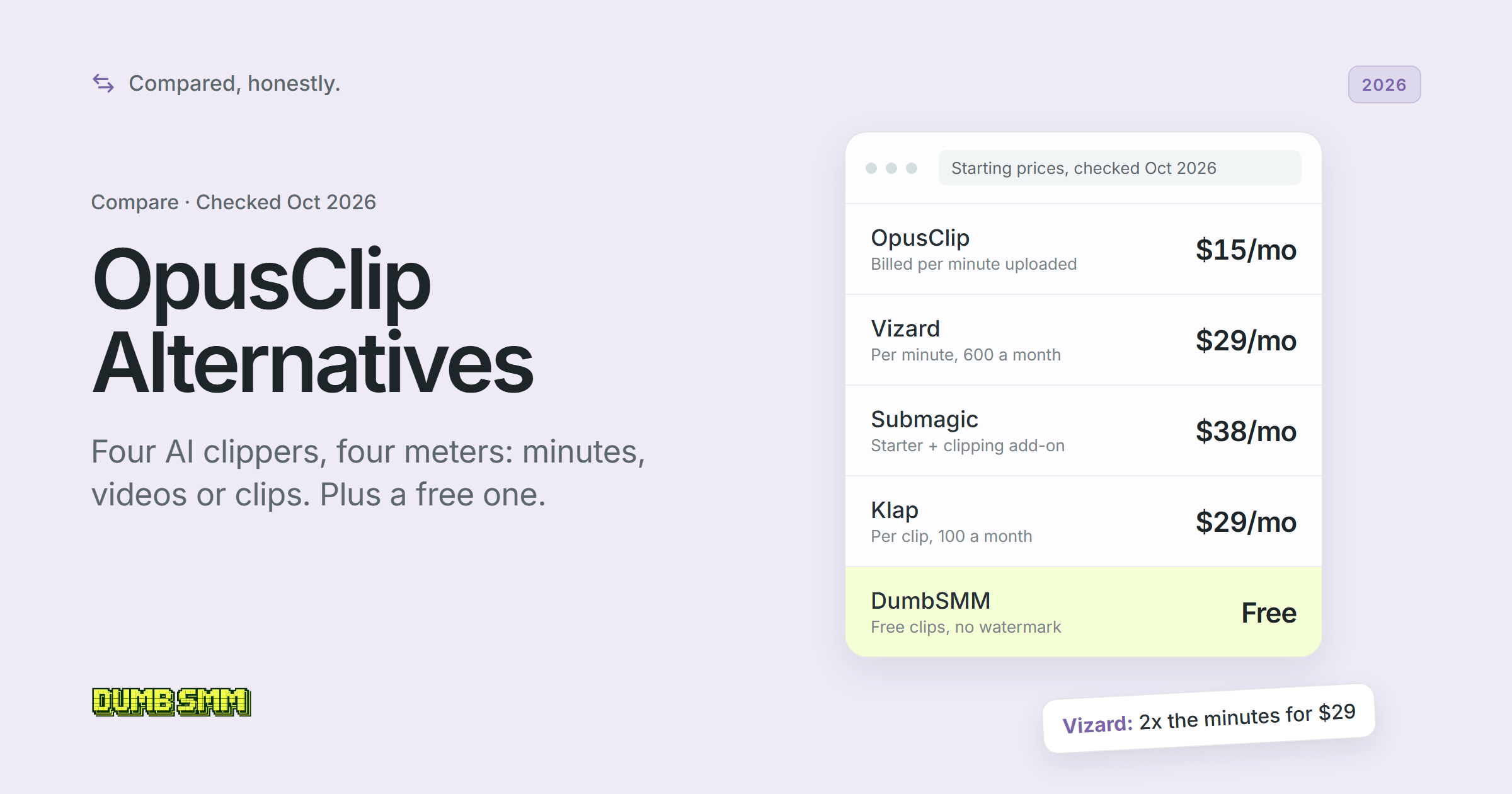
Opus Clip alternatives compared: Vizard, Submagic and Klap bill by minutes, videos or clips. What 5 hours of clipping costs on each, plus a free pick.
 DumbSMM Team
On this page 10 sections
- The 5 AI clipping tools at a glance
- What clipping 5 hours of video a month costs
- What changes at 2 and 10 hours
- How we compared
- OpusClip: best for the smartest clip picking
- Vizard: best for the most minutes per dollar
- Submagic: best for captions that look designed
- Klap: best for long episodes and lots of social accounts
- DumbSMM: the free OpusClip alternative (full disclosure: we make it)
- Which one should you pick?
- OpusClip alternatives FAQ
- What is the best OpusClip alternative?
- Is there a free OpusClip alternative with no watermark?
- Is Vizard better than OpusClip?
- Is Klap cheaper than OpusClip?
- What is the best Submagic alternative?
- Can I get a refund from OpusClip, Vizard, Submagic or Klap?
OpusClip (opus.pro) is the AI clipping tool many people try first, and it's good. People still go hunting for an Opus Clip alternative, and the reasons are printed on OpusClip's own pricing page and help center:
- You pay for every minute you upload. One credit is one minute of the original video, so a 30-minute podcast costs 30 credits whether you get 3 clips back or 30. Pro's 300 credits a month cover 5 hours of footage.
- The free plan watermarks everything. You get 60 credits a month, an OpusClip logo on every export, and no editing.
- Free clips expire. After 3 days you can't export them, and the uploaded media is gone too.
We compared the three names that keep coming up next to it, Vizard (vizard.ai), Submagic (submagic.co) and Klap (klap.app), plus our own free clipper, DumbSMM. The paid tools meter minutes, videos or clips, so which one is cheapest depends on how much you film. (If you searched "clip alternative" and got machine learning papers, wrong CLIP. This one cuts videos.)
Prices checked on October 12, 2026. OpusClip and Submagic show USD; Vizard and Klap show "$" without naming a currency, so we assume USD. Plans change often, so check OpusClip, Vizard, Submagic and Klap before you pay.
The 5 AI clipping tools at a glance#
All five turn a long video into captioned vertical clips. Where they split is what they bill for and what you can do with a clip once it exists.
| OpusClip | Vizard | Submagic | Klap | DumbSMM | |
|---|---|---|---|---|---|
| What it meters | Minutes uploaded (1 credit = 1 min) | Minutes uploaded (1 credit = 1 min) | Videos per member; clipping is an add-on (10 uploads) | Clips generated (100, 300 or 1,000 a month) | None, no paid plans |
| Free plan | Yes: 60 min/mo, watermark, no editing, 3-day export window | Yes: 60 min/mo, watermark, 720p, 10-min exports | Trial only: 3 short videos, watermark | No: 1 free video. Klap says no watermark on any plan | Yes: no watermark, no account to start |
| Cheapest paid, monthly | $15/mo Starter | $29/mo Creator | $19/member/mo Starter, +$19/mo to clip | $29/mo Basic | None |
| Cheapest paid, yearly | $14.50/mo Pro ($174/yr) | $14.50/mo Creator ($174/yr) | $12/member/mo Starter ($144/yr per member), plus the add-on | $14/mo Basic | None |
| Editor | Yes, Starter and up | Yes, every plan | Yes, full editor | Yes, transcript and full editor | No |
| Virality score | Yes, 0-99 | Yes | Yes, per Magic Clip | Yes, 0-100 | No |
| Languages | 25+ for transcription (20 in beta) | 40 for transcription, 128 for translation | 100+ (Submagic's count) | 52 | Not documented, no translation |
| Posting and scheduling | Starter: YouTube, TikTok, Instagram. Pro: 9 platforms and a scheduler | 6 platforms; scheduling on paid plans | TikTok, Instagram, YouTube Shorts; scheduling on Pro and up | YouTube, TikTok, Instagram, LinkedIn, Facebook; unlimited accounts | TikTok, Reels, Shorts; free, best hours first |
| API | Pro (beta) and up, plus MCP | Paid plans | Yes, plus webhooks and MCP | Yes, pay per operation | No |
| Best for | Smartest clip picking, pro editor handoff | Most minutes per dollar | Captions that look designed | Long episodes, many accounts | Free clips, auto-posted |
What clipping 5 hours of video a month costs#
At monthly prices, clipping about 5 hours of long video a month costs $29 on OpusClip, Vizard and Klap and $38 on Submagic. DumbSMM has no paid plans. Three of them cost the same but don't buy the same thing:
- OpusClip and Vizard count upload minutes. On both, 1 credit is 1 minute of source video. The difference is the bucket: $29 gets you 300 credits on OpusClip Pro and 600 on Vizard Creator.
- Klap counts clips generated, 100, 300 or 1,000 a month. Klap estimates 20-40 clips from a 2-hour podcast but 8-15 from one 20-minute video, so long episodes are cheap and stacks of short videos aren't.
- Submagic counts videos per member. Its plans (15, 40 or 100 videos a month, capped at 2, 5 or 30 minutes each) edit videos you've already cut. Clipping a long one takes the Magic Clips add-on, $19 a month for 10 uploads, which appears in the help center but not on the pricing page.
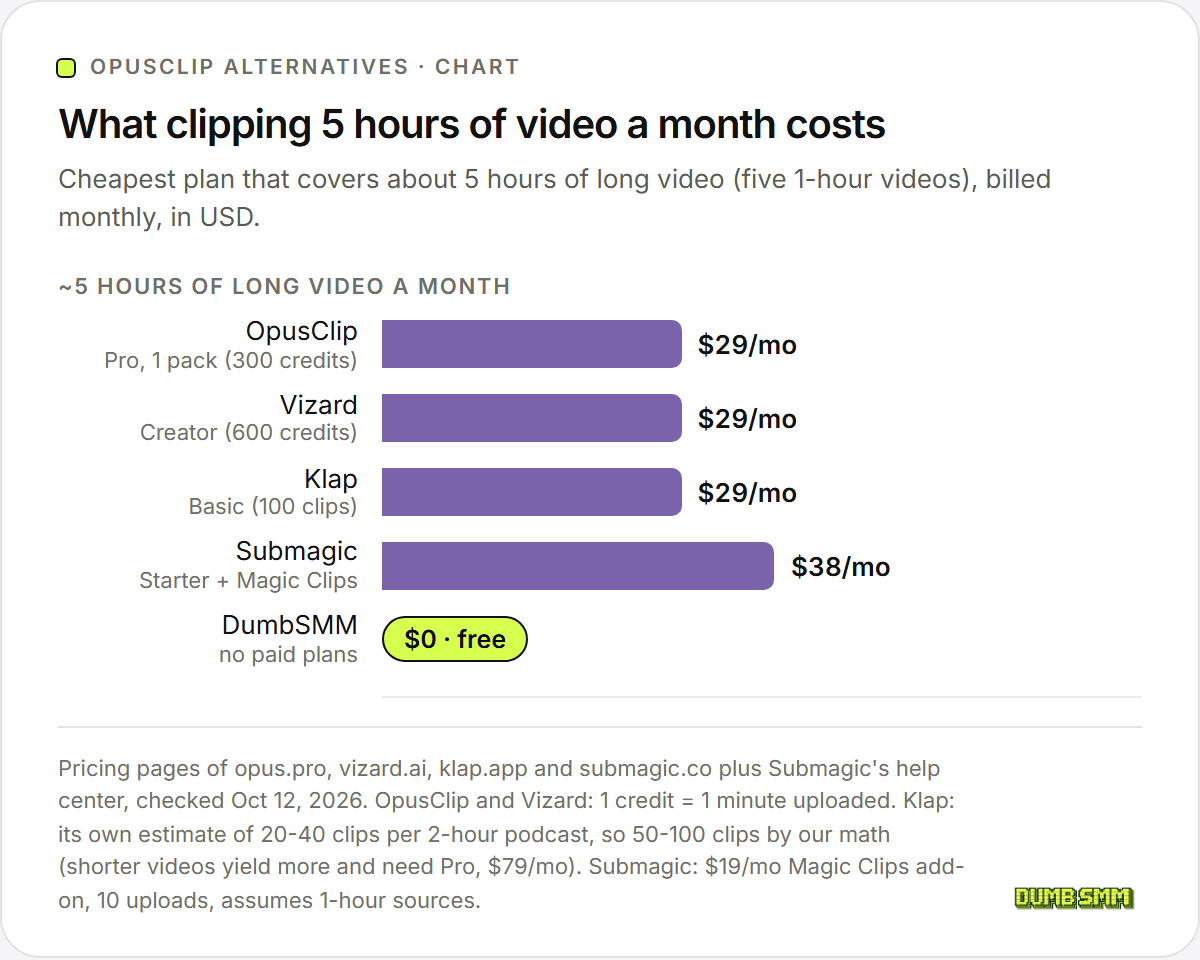
| Tool | Cheapest plan for ~5 hours a month | Billed monthly | Billed yearly | How we counted |
|---|---|---|---|---|
| OpusClip | Pro, 1 pack (300 credits) | $29/mo | $14.50/mo ($174/yr) | 5 hours is 300 credits, exactly one pack. Starter's 150 credits cover 2.5 hours |
| Vizard | Creator (600 credits) | $29/mo | $14.50/mo ($174/yr) | 300 credits used, 300 to spare |
| Klap | Basic (100 clips) | $29/mo | $14/mo | Klap's own estimate for long episodes (20-40 clips per 2 hours) gives 50-100 clips by our math. Its estimate for shorter videos (8-15 per 20 minutes) gives 120-225, which needs Pro: $79/mo, or $39 billed yearly |
| Submagic | Starter + Magic Clips (10 uploads) | $38/mo | $31/mo | Five 1-hour uploads. Assumes the add-on stays $19 on yearly billing, since no yearly price is published |
We assumed five 1-hour videos a month, roughly a weekly hour-long podcast, and the cheapest plan that covers them.
What changes at 2 and 10 hours#
| Long video per month | OpusClip | Vizard | Klap | Submagic |
|---|---|---|---|---|
| ~2 hours | $15 (Starter) | $29 (Creator) | $29 (Basic) | $38 (Starter + Magic Clips) |
| ~5 hours | $29 (Pro, 1 pack) | $29 (Creator) | $29 (Basic) | $38 (Starter + Magic Clips) |
| ~10 hours | $58 (Pro, 2 packs) | $29 (Creator, all 600 credits) | $79 (Pro) | $38 (all 10 uploads) |
If you clip a couple of hours a month, OpusClip's $15 Starter is the cheapest month-to-month plan. At 10 hours Vizard wins easily, because its smallest paid tier already holds 600 minutes. Klap moves with your clip count (these figures use Klap's own long-episode estimate). Submagic stays flat up to 10 one-hour uploads, and past that it doesn't say whether add-ons stack (bigger limits mean a Custom plan).
How we compared#
We read each tool's pricing page, help center, API docs and terms on October 12, 2026, plus DumbSMM's own public pages. We didn't buy or test any paid plan, so nothing here grades clip quality. Ratings are as shown that day.
| Tool | Trustpilot | Product Hunt |
|---|---|---|
| OpusClip | 4.0/5 from 509 reviews (20% one-star) | Page didn't load for us |
| Vizard | 4.7/5 from 2,521 reviews (8 in the last 12 months) | 4.6/5 from 18 reviews |
| Submagic | 4.5/5 from 850 reviews | 4.4/5 from 30 reviews |
| Klap | 3.7/5 from 51 reviews (31% one-star) | No listing for klap.app |
The negative reviews on all four Trustpilot pages cover the same ground: billing, cancelling and slow support. DumbSMM is young and has no G2, Capterra or Trustpilot reviews yet.
OpusClip: best for the smartest clip picking#
Price: Free $0 (60 credits a month, watermarked). Starter $15/mo, monthly only (150 credits). Pro $29/mo, or $14.50/mo billed yearly ($174), with 300 credits per pack. Business is custom. The 7-day trial of the paid plans keeps the watermark.
OpusClip turns long videos into shorts in the browser and publishes them to social platforms. It's the one the others measure themselves against: Vizard and Klap both publish pages comparing themselves to it.
Where it wins:
- Clip picking. ClipAnything reads visual, audio and sentiment cues, so it handles vlogs, sports and other video with little talking, and you can type a prompt to pull specific moments. Each clip gets a 0-99 Virality Score built from hook, flow, value and trend.
- Editing and handoff. Starter and up get a text and timeline editor with filler and silence removal. Pro adds AI B-roll, square and widescreen output, and XML export to Premiere Pro and DaVinci Resolve.
- Reach. Pro posts and schedules to 9 platforms, including X, LinkedIn, Pinterest, Threads and Bluesky.
- Inputs and hookups. Pro takes videos up to 10 hours and 30 GB from 18+ link sources like Twitch, Riverside and Zoom, and adds an API (beta) and an MCP connector. There's also an official Claude connector. Auto Import clips new uploads from your YouTube channel by itself.
The catch:
- The meter. You pay for the dull minutes too, though a slider lets you process just part of a video.
- Murky yearly credits. The pricing page says yearly Pro gets 300 credits a month with 2 months of rollover. The help center says you get the full year's credits up front, valid for 12 months. Either way, the terms rule out prorated refunds.
- Basic bulk scheduling. It's YouTube-only and posts at a fixed interval that "does not skip weekends, holidays, or 'ideal' posting times."
- Split reviews. A fifth of its Trustpilot reviews are one-star, and recent ones cite charges after cancelling and slow support, though OpusClip answers all of them.
We break down every plan in OpusClip pricing, and OpusClip vs DumbSMM goes head to head.
Vizard: best for the most minutes per dollar#
Price: Free $0 (60 credits a month, watermarked, 720p). Creator $29/mo for 600 credits, or $14.50/mo billed yearly ($174). Business $39/mo ($19.50 billed yearly, $234), plus $10 a month per extra seat ($5 yearly). There's no trial of the paid plans.
Vizard (vizard.ai, not the VR software with the same name) is an AI clipper aimed at podcasts, webinars, interviews and courses. It bills like OpusClip, 1 credit per uploaded minute, and comes with a text-based editor, a scheduler and publishing to 6 platforms.
Where it wins:
- Twice the minutes. $29 buys 600 upload minutes a month, against 300 on OpusClip Pro.
- An editor on every plan, Free included, with transcript editing, a timeline and one-click ratio changes.
- Languages. It transcribes 40 and translates subtitles into 128, per its help center.
- Auto-Schedule. Set a minimum viral score and a posting window, and it fills your calendar with up to 10 clips a day. Vizard publishes to TikTok, YouTube, Instagram, X, Facebook Pages and LinkedIn.
- Big files. Up to 600 minutes per upload, 4K export and an API on both paid plans.
The catch:
- Free is thin. Exports are 720p, capped at 10 minutes and watermarked, projects last 3 days, and you can connect one TikTok account.
- Refunds only if unused. You have 7 days, and uploading anything counts as use.
- Credits on cancel. The help center says monthly minutes carry over, but Trustpilot reviewers say unused credits are forfeited when you cancel. Trustpilot also notes Vizard hasn't replied to negative reviews.
- A broad license. The terms (last updated October 2022) give Vizard a perpetual, irrevocable, sub-licensable license to what you upload. You keep ownership.
Submagic: best for captions that look designed#
Price: Starter $19 per member a month ($12 billed yearly, $144), Pro $39 ($23, $276), Business $69 ($41, $492). Clipping long videos takes the Magic Clips add-on, $19 a month for 10 uploads. The free trial covers 3 short videos with no card, and exports are watermarked.
Submagic is an AI editor for short-form video, made in Paris and known for animated captions, the bouncy word-by-word kind all over Reels. Its Magic Clips add-on cuts a long video into 20+ clips, each with a virality score and a transcript.
Where it wins:
- Captions. 35+ animation templates, premium themes on Pro and up, custom fonts, a brand kit, highlight colors and a custom dictionary.
- Finishing edits. Storyblocks B-roll, auto zooms, cutting silences, bad takes and filler words, audio cleanup, eye contact correction and AI hook titles.
- Output. 9:16, 16:9, 1:1 and 4:5, up to 4K at 60 FPS on Business.
- Languages. 100+ by Submagic's count (its own pages say anywhere from 48+ to 123), with caption and voice translation.
- Extras. 120+ AI avatars with lip sync on Pro and up, plus an API with webhooks, an MCP server and Zapier, Make and n8n.
The catch:
- Clipping and scheduling cost extra. Clipping a long video adds $19 a month, and posting on a future date needs Pro, so doing both is $58 a month.
- Per member. A second person doubles the base plan.
- Three platforms. TikTok, Instagram (Reels and Stories) and YouTube Shorts. LinkedIn, Facebook and X are "coming soon."
- No refunds, apart from a 14-day withdrawal right for consumers. Trustpilot complaints center on renewals charged without a reminder.
Shopping for a Submagic alternative because of the add-on math? The other three clip long videos on their base plans.
Klap: best for long episodes and lots of social accounts#
Price: Basic $29/mo, or $14/mo billed yearly (100 clips a month). Pro $79, or $39 (300 clips). Pro+ $189, or $94 (1,000 clips). No ongoing free plan, just 1 free video with no card.
Klap (klap.app, from ZIGG SAS in France) takes an upload or a link and cuts vertical, captioned, reframed shorts, each with a virality score. Klap says it does best with speech-heavy video like podcasts, interviews and tutorials.
Where it wins:
- Long episodes are cheap. You pay by the clip, so a 2-hour podcast costs no more than a short video that yields the same number of clips.
- Ranking and reframing. A 0-100 Virality Score sorts clips best-first, and AI Reframe 2 adds split screen, screencast and gaming layouts.
- Posting on the cheapest plan. Every plan gets unlimited social accounts, posting to YouTube, TikTok, Instagram, LinkedIn and Facebook, scheduling weeks or months out, and analytics.
- Languages and hookups. 52 languages for transcription, captions and subtitle translation, plus Zapier, Make, n8n and connectors for Claude and ChatGPT.
- Refunds in writing. You can ask for one before your first month ends, or for up to 3 recent months you didn't use. On paper that's the friendliest policy of the four.
The catch:
- A muddy free try. Klap's tool pages say clips on the free plan have no watermark, but in a public Trustpilot reply (October 2025) Klap said downloads and posting need a subscription.
- Pages that disagree. The homepage FAQ still says Pro is $29 a month, while the pricing page lists $29 as Basic and Pro at $79. Go by the pricing page.
- Manual timing. You pick post times with a date picker, and Klap doesn't mention any feature that finds your best times.
- The weakest reviews here. Nearly a third of its Trustpilot reviews are one-star, mostly about billing and cancelling.
The full matchup is in Klap vs DumbSMM.
DumbSMM: the free OpusClip alternative (full disclosure: we make it)#
Price: Free. There are no paid plans on offer today.
DumbSMM (dumbsmm.wtf) is our free marketing toolbox for founders and small teams. Its AI clip maker turns a YouTube link or an uploaded video into captioned vertical clips for TikTok, Reels and Shorts. You don't need an account, and the clips have no watermark.
Sign in and Schedule auto-posts them to TikTok, Instagram Reels and YouTube Shorts, also for free. Once your posts have some history it favors the hours and weekdays that got the most views. It also checks each account's views once a day, and if one platform drops to near zero, it slows posting there only and emails you a recovery checklist. The same toolbox has a short video maker and Remix for making shorts from scratch or from a video link.
What it doesn't do: there's no clip editor and no virality score. It has no published language list and doesn't translate or dub. There's no public API or MCP, no team seats, and no posting beyond TikTok, Instagram and YouTube. If you need any of that, one of the four tools above is worth paying for.
Which one should you pick?#
Picking the best AI clip maker mostly comes down to how much you film and what you do with a clip afterwards.
- Pick OpusClip for the smartest clip picking, Premiere Pro or DaVinci Resolve handoff, or posting to 9 platforms. Under 2.5 hours a month, its $15 Starter is the cheapest month-to-month plan here.
- Pick Vizard if you clip a lot. $29 buys 600 minutes, twice OpusClip Pro, and even Free has an editor.
- Pick Submagic if captions are your brand and you finish videos by hand. Budget $38 a month to clip, $58 to clip and schedule.
- Pick Klap for long episodes, lots of social accounts, or LinkedIn and Facebook posting on the cheapest plan.
- Pick DumbSMM if you want clips without a watermark, auto-posted to TikTok, Reels and Shorts for $0, and can live without an editor.
Want AI to make TikToks from scratch instead of clipping what you filmed? See our AI TikTok automation tools roundup.
OpusClip alternatives FAQ#
What is the best OpusClip alternative?#
For most people, Vizard. It also bills per minute of uploaded video, but $29 a month buys 600 minutes against 300 on OpusClip Pro, and even its free plan has an editor. Klap suits long podcasts because it charges per clip, Submagic wins on captions, and DumbSMM is the free option.
Is there a free OpusClip alternative with no watermark?#
Yes. DumbSMM's AI clip maker is free, needs no account and adds no watermark. OpusClip's and Vizard's free plans watermark every clip, and so do Submagic's free trial exports. Klap says it never watermarks, but it gives you only 1 free video and has said trial downloads need a subscription.
Is Vizard better than OpusClip?#
On price per minute, yes: both charge 1 credit per uploaded minute, and Vizard's $29 plan includes twice the credits of OpusClip's $29 Pro. OpusClip does more around the clips, with 9 posting platforms instead of 6, XML export to Premiere Pro and DaVinci Resolve, and a cheaper $15 entry plan.
Is Klap cheaper than OpusClip?#
It depends on how long your videos are. Klap charges per clip, and by our math from Klap's own clip estimates, about 5 hours of hour-long episodes fits its $29 Basic plan, the same price as OpusClip Pro. Klap estimates that short videos yield more clips per hour, and the same 5 hours can push you to Klap's $79 Pro plan.
What is the best Submagic alternative?#
If you mostly use Submagic to clip long videos, OpusClip, Vizard and Klap do that on their base plans, while Submagic adds a $19-a-month Magic Clips add-on. If you use it for captions, it's hard to replace. For free clipping and auto-posting to TikTok, Reels and Shorts, there's DumbSMM.
Can I get a refund from OpusClip, Vizard, Submagic or Klap?#
Rarely. OpusClip's terms rule out prorated refunds, and Submagic doesn't refund apart from a 14-day withdrawal right for consumers. Vizard refunds within 7 days, but only if you haven't used it. Klap is the most generous on paper: you can ask before your first month ends, or for up to 3 recent months you didn't use.
Sources:
- OpusClip pricing
- OpusClip help: How do credits work?
- OpusClip help: Plans
- OpusClip help: Watermark
- OpusClip help: Bulk scheduler
- OpusClip help: ClipAnything and Virality Score
- OpusClip terms of service
- Vizard pricing
- Vizard help: What does the free plan offer?
- Vizard help: Can I request a refund?
- Vizard help: How does the pricing plan work?
- Vizard help: Supported languages
- Vizard help: Auto-Schedule
- Vizard terms of service
- Submagic pricing
- Submagic help: How much does it cost?
- Submagic help: How to use Magic Clips
- Submagic help: Free trial
- Submagic help: Size and length limits
- Submagic help: Refund policy
- Submagic social media scheduler
- Submagic terms of use
- Klap pricing
- Klap homepage and FAQ
- Klap AI clip generator and AI clip maker
- Klap terms of service
- Klap API pricing
- Klap blog: How to schedule TikTok posts
- Trustpilot: OpusClip, Vizard, Submagic, Klap
- Product Hunt: Vizard, Submagic
All checked October 12, 2026. DumbSMM is not affiliated with OpusClip, Vizard, Submagic or Klap.