

OpusClip vs DumbSMM (2026): What the Pricing, Docs and 509 Reviews Say
Opus Clip review 2026: $15 to $29 a month, billed per minute of video, 4.0 on Trustpilot (Oct 2026). Where OpusClip wins, and when free DumbSMM is enough.
 DumbSMM Team
On this page 9 sections
- What is OpusClip?
- What OpusClip users say
- OpusClip pricing in 2026
- Where OpusClip's own docs disagree
- OpusClip vs DumbSMM at a glance
- What OpusClip costs for 2, 5 and 10 hours of video a month
- Where OpusClip wins
- Where DumbSMM wins (full disclosure: we make it)
- Who should pay for OpusClip?
- Which should you pick?
- Other AI clipping tools to consider
- OpusClip vs DumbSMM FAQ
- Is OpusClip worth it?
- Is OpusClip free, and does it have a watermark?
- Can OpusClip post directly to TikTok, YouTube and Instagram?
- Does OpusClip work for gaming or non-talking videos?
- Can I cancel OpusClip and get a refund?
- What's the best free OpusClip alternative?
That's our Opus Clip review in four sentences. We didn't buy a paid plan, so nothing here is a hands-on test of one. We read OpusClip's pricing page, more than 30 of its help-center articles, its terms and its Trustpilot page (509 reviews, seen October 12, 2026), and noted every spot where its own docs disagree.
A competitor wrote this, so we'll be specific about where OpusClip is better. That turns out to be most of the clipping itself.
Prices checked on October 12, 2026, in USD from a US connection. OpusClip changes plans often, so check opus.pro/pricing before you pay.
What is OpusClip?#
OpusClip is a browser-based AI clipper from Opusclip Inc. (Palo Alto) that turns long videos into short clips and posts them to social platforms. Give it a podcast, stream, webinar or vlog and it picks the moments, reframes them, adds animated captions and, on paid plans, scores each clip from 0 to 99.
It's sold to creators, podcasters, marketers and agencies, and Pro adds a scheduler, team workspaces and an API. Know one thing up front: it bills by the minute of video you feed it, not by the clip. A 30-minute podcast costs 30 credits whether you keep 3 clips or 30.
What OpusClip users say#
On Trustpilot, OpusClip scores 4.0 out of 5 ("Great") from 509 reviews, 407 of them from the last 12 months (seen October 12, 2026). The split is lopsided: 63% 5-star, 20% 1-star, and not much in between.
Trustpilot's AI summary of 403 recent reviews says people like the ease of use, the clean interface and the time saved, and many call support helpful. The complaints are slow support, abandoned chats and long waits for refunds. The praise is mostly about the product. The anger is mostly about billing and support.
The newest 1-star reviews (September 5 to October 3, 2026) are mostly about money and slow replies: charges after cancelling (one reviewer says they emailed 16 times), a 4-day wait after an invoicing bug and a 20-day refund review. One is about failed uploads. OpusClip replied to each one, and Trustpilot shows it answers 100% of negative reviews.
The help center even has an article called "My account shows as free, but I am still getting billed" (the usual cause is a billing email that differs from the login email). G2, Capterra and Product Hunt blocked our checks, so we don't quote them.
OpusClip pricing in 2026#
OpusClip has four plans in 2026: Free at $0, Starter at $15 a month, Pro at $29 a month ($14.50 billed yearly) and Business at a custom price.
| Free | Starter | Pro (1 pack) | Business | |
|---|---|---|---|---|
| Price | $0 | $15/month, monthly only | $29/month, or $14.50/month billed yearly ($174) | Custom |
| Credits (1 credit = 1 min of video) | 60/month | 150/month | 300/month per pack | Custom |
| Watermark | Yes | No | No | No |
| Editor | No | Yes | Yes | Yes |
| Aspect ratios | 9:16 | 9:16 | 9:16, 1:1, 16:9 | 9:16, 1:1, 16:9 |
| Auto-posting | Not listed | YouTube, TikTok, Instagram (post now) | 9 platforms, plus the scheduler | Everything in Pro |
Pro comes in packs. Each one adds 300 credits a month and 2 seats (4 seats max), so two packs cost $58 a month, or $29 a month billed yearly ($348).
Oddly, Pro billed yearly is 50 cents a month cheaper than Starter and has twice the credits. The catch is paying $174 up front. Our OpusClip pricing breakdown has the plan-by-plan credit math.
Where OpusClip's own docs disagree#
OpusClip's pages contradict each other in four places. None of it is a dealbreaker, but get support's answer in writing before you count on either version.
- Yearly credits. The pricing page says yearly Pro gets 300 credits a month with a 2-month rollover. The help center says you get "the full year's worth of credits immediately upon purchase," valid for 12 months.
- Credits after you cancel. One help article says they keep "their original expiration date." Another says they "expire at the end of your current billing cycle."
- Starter B-roll. The pricing page says 3 AI image and 3 stock clips a month. The B-roll help article says 3 a day.
- Max upload size. The pricing page says 30GB on Pro and Business. The local-uploads article still says 10GB.
OpusClip vs DumbSMM at a glance#
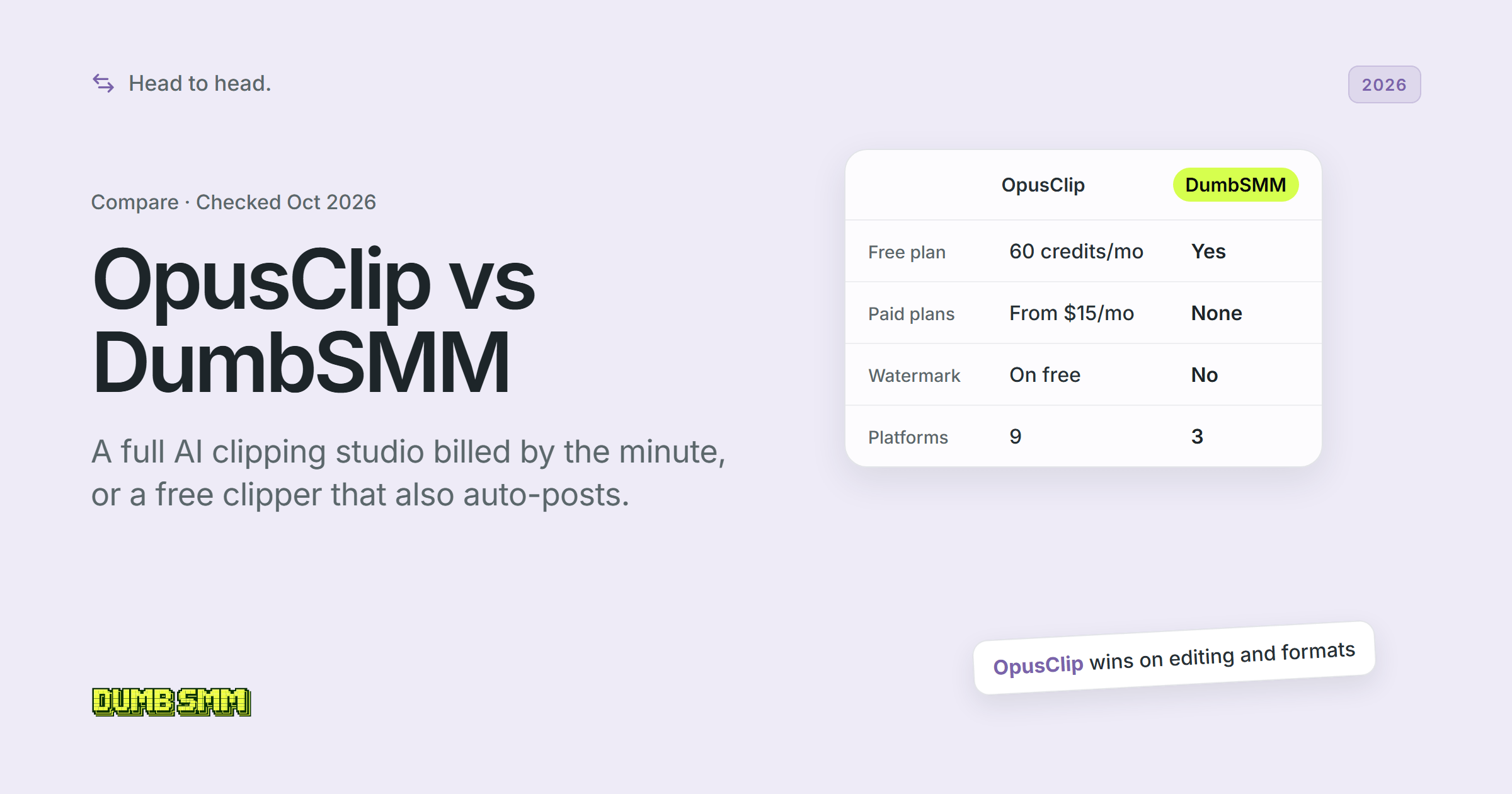
OpusClip is a paid clipping studio with an editor and 9 posting destinations, while DumbSMM is a free clipper and auto-poster for 3 short-video platforms. Full disclosure: we make DumbSMM.
| OpusClip | DumbSMM | |
|---|---|---|
| Starting price | $0 Free (60 credits/month, watermarked); paid from $15/month (Starter) or $14.50/month (Pro billed $174/year) | Free; no paid plans offered today |
| Free plan | Yes: 60 credits/month, up to 1080p, no editing, 3-day export window | Yes: public tools need no account; scheduling and auto-posting free when signed in |
| Watermark on free | Yes, OpusClip logo (also during the trial) | No |
| Billing unit | Credits: 1 credit = 1 minute of source video; Pro sold in 300-credit packs | None (free) |
| Video sources | Local upload + 18 link sources (YouTube, Google Drive, Vimeo, Zoom, Twitch, Riverside, Loom, X, public MP4 and more), gated by plan | YouTube link or upload |
| Max video length | 10 hours; 10GB (Free, Starter) or 30GB (Pro and up) | Not stated |
| Reframing | Yes: 9:16 on Free and Starter; 1:1, 16:9 and object tracking on Pro | Vertical 9:16 clips |
| Clip scoring | Virality Score 0-99 (Starter and up) | Not stated |
| Editor | Text and timeline editor on Starter and up; none on Free | Not stated |
| Export to Premiere Pro / DaVinci Resolve | Pro and up (XML) | No |
| Auto-posting | Starter: YouTube, TikTok, Instagram. Pro adds Facebook, LinkedIn, X, Pinterest, Threads, Bluesky | TikTok, Instagram Reels, YouTube Shorts |
| Scheduling and posting times | Scheduler and calendar on Pro; bulk scheduler is YouTube-only at a fixed interval; best-time picking not stated | Yes: times adapt to each account's best weekday and hour |
| Account health monitoring | Not stated | Yes: watches each account's views, slows posting on a platform when they drop |
| Team seats | Pro: 2 per pack, max 4; Business unlimited | No |
| API | Yes: Pro (beta, 900 credits/month cap), Max, Business; MCP, Claude connector, Zapier | No public API |
What OpusClip costs for 2, 5 and 10 hours of video a month#
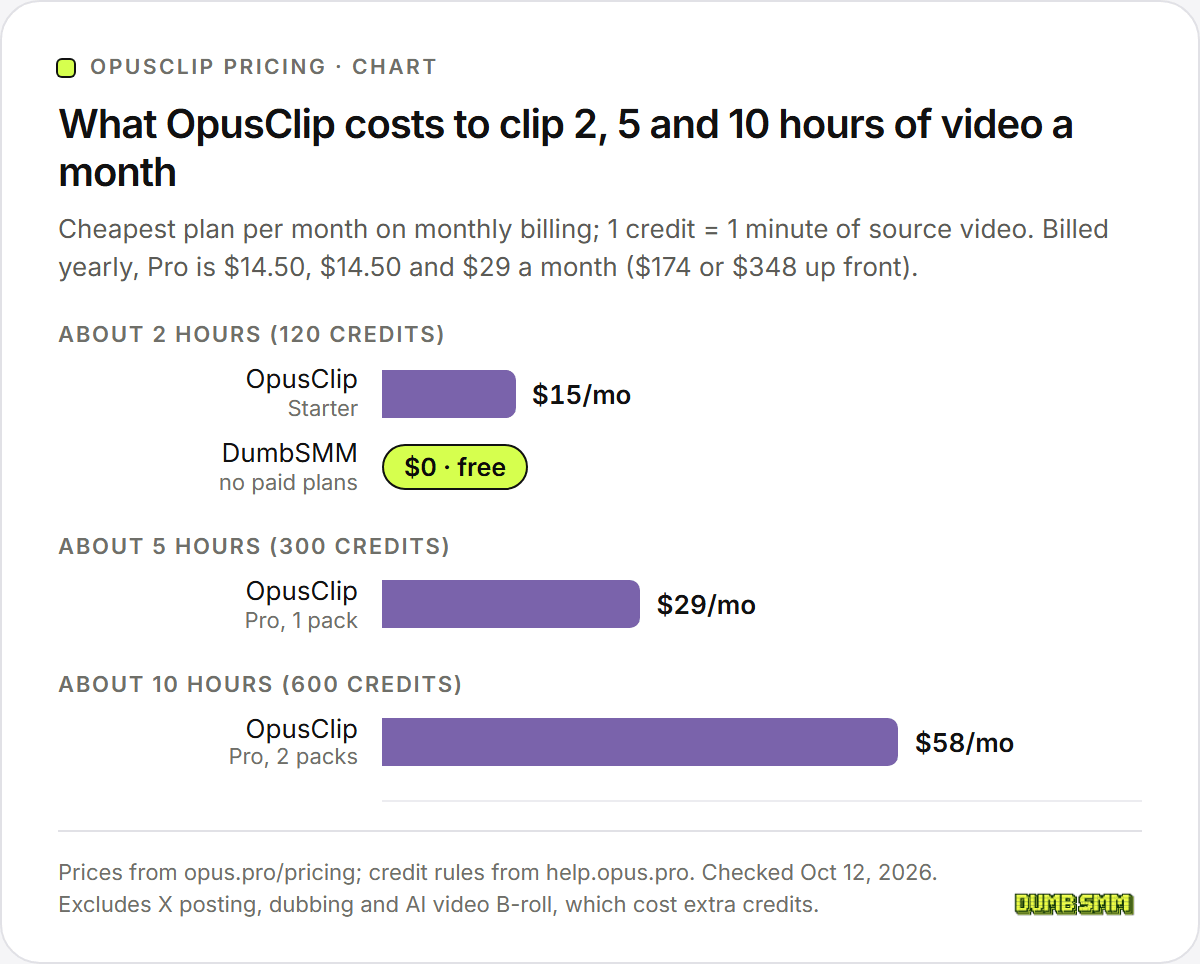
Month to month, OpusClip runs $15, $29 and $58 as you go from 2 to 5 to 10 hours of video. Paying yearly halves Pro, but you hand over $174 or $348 up front.
| Video per month | Credits needed | Cheapest monthly | Cheapest billed yearly |
|---|---|---|---|
| About 2 hours | 120 | Starter, $15/month | Pro 1 pack, $14.50/month ($174/year) |
| About 5 hours | 300 | Pro 1 pack, $29/month | Pro 1 pack, $14.50/month ($174/year) |
| About 10 hours | 600 | Pro 2 packs, $58/month | Pro 2 packs, $29/month ($348/year) |
That assumes no X posting, dubbing or AI video B-roll, which all cost extra credits.
Where OpusClip wins#
OpusClip wins on nearly everything between upload and export, and it isn't close.
- ClipAnything picks clips from visual, audio and sentiment cues, so OpusClip says it handles vlogs, sports and other low-dialogue video. On Pro you can type a prompt to pull specific moments, and paid plans score every clip from 0 to 99 on hook, flow, value and trend.
- The editor is a real one: text and timeline editing, caption styling down to per-word timing, filler and silence removal, voice-over, B-roll, music and speech enhancement.
- Pro exports 9:16, 1:1 and 16:9 (plus 4:5 in the editor), reframes around moving speakers and objects, exports 4K from real 4K sources, and hands the cut to Premiere Pro or DaVinci Resolve as XML.
- It transcribes 25 languages (20 of them in beta) and, on Pro, dubs into 25 in your own cloned voice.
- It posts to nine platforms: YouTube, Instagram Reels, TikTok, Facebook, LinkedIn, X, Pinterest, Threads and Bluesky, with several accounts per platform on Pro. We post to 3.
- Teams share workspaces, credits and brand templates (up to 4 seats on Pro, unlimited on Business). Developers get an API with webhooks, an MCP connector, an official Claude connector and Zapier.
- It takes videos up to 10 hours long (30GB on Pro) from 18+ link sources, Twitch, Riverside and Zoom among them. On Starter and Pro, Auto Import can clip your new YouTube uploads by itself.
- It has a track record: 509 Trustpilot reviews (seen October 12, 2026), SOC 2 Type 2 listed on its pricing page, and an iOS app. We're new, with no review-site ratings yet.
Where DumbSMM wins (full disclosure: we make it)#
DumbSMM wins when you want vertical clips posted to TikTok, Instagram and YouTube without paying or doing credit math.
- It's free. The AI clip maker, scheduling and auto-posting cost nothing, there are no paid plans on offer today, and there are no credits, packs or rollover rules to learn. OpusClip's scheduler starts at Pro: $29 a month, or $14.50 billed $174 a year.
- You can start without an account. Paste a YouTube link or upload a video and you get captioned vertical clips with no watermark. OpusClip's Free plan and trial put its logo on exports, and you need an account first.
- Posting times adapt. Once your posts have history, DumbSMM favours the hours and weekdays that got each account the most views, and it spaces each account's posts hours apart. OpusClip's bulk scheduler is YouTube-only, posts at a fixed interval, and its help center says it "does not skip weekends, holidays, or 'ideal' posting times."
- It watches your views. Once a day, DumbSMM compares each account's recent views with its usual numbers. If one platform drops to near zero, it slows posting there only, emails you a recovery checklist and speeds back up as views recover. Our page admits it "can't read TikTok's mind," but a cliff in your views is hard to miss. We found nothing like it in OpusClip's docs.
- It makes more than clips. The short video maker turns your website into UGC-style videos (a stock reaction clip, hook text and your product demo), product demos and memes. Remix trims a video link and adds your own B-roll.
Here's what we don't do. Our clipper's page doesn't document an editor, clip scores, B-roll or formats beyond vertical. DumbSMM has no Premiere export, no platforms beyond TikTok, Instagram and YouTube, no team seats and no public API. It's young, with no Trustpilot or G2 reviews yet. If you need any of that, OpusClip is the better tool.
Who should pay for OpusClip?#
Pay for OpusClip if editing, extra formats or teamwork matter more to you than the bill.
- If you run a weekly show (2 to 5 hours of video a month) and you're sure about the year, Pro billed yearly costs less than Starter and covers 5 hours.
- If you're still testing, Starter at $15 a month is the cheapest watermark-free way in, billed monthly only.
- If you hand off to Premiere Pro or DaVinci Resolve, need 1:1 or 16:9, or share a workspace, you need Pro (Business past 4 seats).
- If you're building a pipeline, the API on Pro and Max is capped at 900 credits (15 hours) a month per workspace, so heavy use means Business.
Who shouldn't pay: anyone who just needs vertical clips on TikTok, Reels and Shorts and won't edit them. A free tool covers that, ours included.
Which should you pick?#
Pick OpusClip if you edit and publish widely, and DumbSMM if you want vertical clips made and posted for free.
Pick OpusClip if:
- You want to pick clips by prompt, see a virality score and edit before you post.
- You need 1:1 or 16:9, 4K, or a hand-off to Premiere Pro or DaVinci Resolve.
- You also post to X, LinkedIn, Facebook, Pinterest, Threads or Bluesky.
- More than one person works on the clips, or you want an API.
Pick DumbSMM if:
- You want clips without a watermark and without paying.
- You only post to TikTok, Instagram Reels and YouTube Shorts.
- You want posting times learned from each account's views, and a check that eases off when views crash.
- You also need short videos made from your website, not just clips.
Start with the free clip maker (no account needed), then connect your accounts in Schedule.
Other AI clipping tools to consider#
Vizard, Submagic and Klap are the other AI clippers people weigh against OpusClip. We line all four up with DumbSMM in OpusClip alternatives.
Vizard bills by the minute like OpusClip and posts to 6 platforms. Submagic is a captions-first editor, and clipping long videos is its paid "Magic Clips" add-on.
Klap meters clips instead of minutes: its Basic plan is 100 clips a month for $29, or $14 a month billed yearly. If it's on your list, read Klap vs DumbSMM.
OpusClip vs DumbSMM FAQ#
Is OpusClip worth it?#
It can be, if you'll use the editor, the extra formats or the team features. Trustpilot shows 4.0 out of 5 from 509 reviews (seen October 12, 2026), with praise for time saved and complaints about support and refunds. If you only need vertical clips for TikTok, Reels and Shorts, a free tool may be enough.
Is OpusClip free, and does it have a watermark?#
Yes, with limits. OpusClip's Free plan includes 60 credits a month, about one hour of video, at up to 1080p, but there's no editing and clips can only be exported for 3 days. Free and 7-day trial exports carry the OpusClip logo; upgrading removes it, even from older projects. Paid plans start at $15 a month in 2026, or $14.50 a month for Pro billed yearly.
Can OpusClip post directly to TikTok, YouTube and Instagram?#
Yes. Starter ($15 a month) can post right away to YouTube, TikTok and Instagram, and Pro adds scheduling plus Facebook, LinkedIn, X, Pinterest, Threads and Bluesky. OpusClip enforces its own daily limits, such as 15 posts a day on TikTok and 40 on Instagram.
Does OpusClip work for gaming or non-talking videos?#
That's what ClipAnything is for. OpusClip says it reads visual, audio and sentiment cues, not just speech, so it can clip videos with little or no dialogue, and on Pro you can type a prompt to pull specific moments. We haven't tested it ourselves.
Can I cancel OpusClip and get a refund?#
Cancelling from the Subscription page takes effect at the start of the next billing cycle, and OpusClip's terms rule out prorated refunds. On Pro, you can get a project's credits back within 14 days of upload if you haven't downloaded a clip.
What's the best free OpusClip alternative?#
DumbSMM's AI clip maker is free with no watermark and no account needed to start, and DumbSMM can auto-post the clips to TikTok, Instagram Reels and YouTube Shorts. We make it, so weigh that. It doesn't match OpusClip's editing or team features. For paid options, see our OpusClip alternatives roundup.
Sources:
- OpusClip pricing
- OpusClip homepage
- OpusClip terms of service
- OpusClip help: How are credits consumed?
- OpusClip help: Plans and credits
- OpusClip help: Where did my minutes go?
- OpusClip help: Features not included in the free trial
- OpusClip help: Pause or cancel a free trial
- OpusClip help: Watermark
- OpusClip help: Can I reprocess a project?
- OpusClip help: Video sources supported
- OpusClip help: Video length
- OpusClip help: Local file uploads
- OpusClip help: Video languages supported
- OpusClip help: Adjust the aspect ratio
- OpusClip help: Download and post in 4K
- OpusClip help: Captions and emojis
- OpusClip help: Virality Score
- OpusClip help: ClipAnything
- OpusClip AI reframe
- OpusClip help: AI B-roll
- OpusClip help: AI video B-roll
- OpusClip help: Video dubbing
- OpusClip help: Add social accounts
- OpusClip help: Bulk scheduler
- OpusClip help: Posting rate limits
- OpusClip help: Auto Import
- OpusClip help: Team management
- OpusClip help: API requests
- OpusClip API limits
- OpusClip API
- OpusClip changelog
- OpusClip help: Mobile app
- OpusClip help: Account shows as free but still billed
- OpusClip on Trustpilot
- OpusClip 1-star reviews on Trustpilot, newest first
- Vizard pricing
- Submagic pricing
- Submagic help: How much does it cost?
- Klap pricing
All checked October 12, 2026. DumbSMM is not affiliated with OpusClip.